· updated Jan 27, 2025 · 30 min read
笔记:读写文本常用操作
近期本人工作中频繁用到跨语言文本读写,本文结合实例介绍使用读写文件的常规操作,以便后续查阅。
语言:MATLAB
操作:读
importdata
data=importdata(data_path);这种方式适合结构化数据的读取,如euroc_ground_truth.txt文件,其内容如下(节选):
# timestamp,tx,ty,tz,qw,qx,qy,qz
1403636580838555648,4.688319,-1.786938,0.783338,0.534108,-0.153029,-0.827383,-0.082152
1403636580843555328,4.688177,-1.786770,0.787350,0.534640,-0.152990,-0.826976,-0.082863
1403636580848555520,4.688028,-1.786598,0.791382,0.535178,-0.152945,-0.826562,-0.083605
1403636580853555456,4.687878,-1.786421,0.795429,0.535715,-0.152884,-0.826146,-0.084391
1403636580858555648,4.687727,-1.786240,0.799484,0.536244,-0.152821,-0.825731,-0.085213
1403636580863555328,4.687579,-1.786059,0.803540,0.536768,-0.152768,-0.825314,-0.086049
1403636580868555520,4.687435,-1.785881,0.807594,0.537289,-0.152725,-0.824896,-0.086890
1403636580873555456,4.687295,-1.785709,0.811642,0.537804,-0.152680,-0.824481,-0.087725
1403636580878555648,4.687158,-1.785544,0.815682,0.538317,-0.152627,-0.824067,-0.088553
1403636580883555328,4.687025,-1.785390,0.819712,0.538828,-0.152566,-0.823657,-0.089371
1403636580888555520,4.686893,-1.785247,0.823734,0.539337,-0.152496,-0.823250,-0.090170
1403636580893555456,4.686763,-1.785116,0.827749,0.539846,-0.152427,-0.822845,-0.090943
可以通过下述方式导入上述数据:
filename = 'euroc_ground_truth.txt';
delimiterIn = ' ';
headerlinesIn = 1;
A = importdata(filename,delimiterIn,headerlinesIn);
txtread
data_pattern='%f,%f,%f,%f,%f,%f,%f,%f';

[timestamp, tx, ty, tz , qw , qx , qy , qz] = ...
 textread(data_path,data_pattern,'delimiter', '\n','headerlines', 1);
textscan
上面几种方式读取到时间戳被自动转换成 double 类型,这不符合我们的预期,此时可以进一步指定格式读取数据,因此提到 textscan 函数。
fid = fopen(data_path);
tline = fgets(fid);    %读取第一行无用数据
data_pattern = '%u64,%f,%f,%f,%f,%f,%f,%f';
data_cell = textscan(fid,data_pattern) ;
fclose(fid);
File 操作
SFM 得到的模型文件中images.txt的格式如下所示(节选):
# Image list with two lines of data per image:
#   IMAGE_ID, QW, QX, QY, QZ, TX, TY, TZ, CAMERA_ID, NAME
#   POINTS2D[] as (X, Y, POINT3D_ID)
# Number of images: 31, mean observations per image: 780.80645161290317
1 0.884099 -0.141937 0.435855 0.0908508 0.456173 1.10575 -0.638635 12 IMG_4774.jpg
1664.41 2219.53 -1 3398.7 902.05 -1 2712.06 961.02 -1 1699.48 1238.63 -1 2879.4 2405.39 -1 2660.97 381.236 -1 3644.9 1452.33 -1 1140.93 1660.45 -1 3591.46 2353.79 -1 79.85 2666.42 -1 1140.46 2684.59 -1 2557.4 1692.47 -1 3016.67 1926.3 -1 454.761 2708.41 -1 1485.06 2722.92 -1 1492.38 1858.58 -1 1433.93 1420.58 -1 1669.55 1613.83 -1 2520.72 2673.94 -1 1046 455.571 -1 3259.22 1748.17 7126 2594.15 2494.27 -1 3093.89 876.393 -1 1660.63 1339.07 -1 832.575 1383.51 -1 149.518 2744.39 -1 3315.03 2473.41 7124 2088.65 620.031 -1 2078.78 966.732 -1 1401 1096.82 8134 3865.21 1484.07 -1 860.423 516.002 -1 3769.77 1725.51 -1 2808.02 1954.06 -1 551.916 2168.01 -1 213.281 2411.6 -1 2802.37 1706.15 -1 3677.91 2856.51 -1 874.193 2740.2 -1 858.867 2068.12 -1 3637.86 1157.71 -1 2475.61 2157.57 -1 2966.61 587.535 6881 3887.21 1767.42 -1 3182.04 1737.79 -1 841.659 1499.39 -1 843.027 1267.73 -1 1213.94 956.537 -1 3728.5 796.223 -1 3283.44 2532.15 -1 3835.46 1967.03 2538 328.52 2892.58 -1 734.794 2687.09 -1 714.173 2556.91 -1 1217.6 2491.75 -1 2723.55 2299.31 -1 873.913 2299 -1 3801.61 2217 -1 1276.33 2783.46 -1 3012.51 2168.26 -1 2890.92 2129.36 5648 3829.79 2093.15 -1 3061.59 1762.5 -1 3531.56 2084.99 -1 1246.53 1960.89 -1 3535.97 1792.58 6883 2109.03 934.487 -1 1288.39 2370.23 -1 892.76 2397.14 -1 763.122 2439.22 -1 958.999 2545.59 -1 870.587 2670.47 -1 337.499 2776.81 -1 2822.44 2829.3 -1 1445.31 2906.54 -1 3812.19 2458.6 5695 1454.09 2816.63 -1 1868.71 984.07 -1 3066.34 1223.46 -1 3864.86 1257.88 -1 3947.42 1345.05 -1 1520.25 1409.18 -1 1481.34 1526.1 -1 735.2 2137.66 -1 3127.57 2157.58 6504 687.177 2245.03 -1 559.242 2298.25 7777 1696.43 1351.53 -1 2880.04 1439.3 -1 38.7915 1549.01 -1 2890.66 1548.36 -1 47.8064 1656.89 -1 3620.52 1682.84 1716 3687.85 1720.03 -1 1722.31 1764.86 -1 254.117 2823.77 -1 181.262 2706.08 -1 160.79 2629.34 -1 324.581 2614.24 -1 2903.75 1780.66 -1 664.931 2602.83 -1 2437.42 2599.08 6885 3511.25 2305.26 -1 868.83 2488.58 -1 374.989 2360.49 -1 374.989 2360.49 -1 450.599 2331.43 -1 2801 2217.58 5656 3507.39 2202.53 7127 3204.93 2177.21 -1 2480.14 2100.03 -1 3218.11 2014.01 -1 3031.36 2002.24 5673 841.39 2006.93 -1 2657.5 1917.97 7549 2699.19 1831.71 -1 3401.06 2131.06 7396 1270.71 2606.61 -1 3595.47 1957.88 7474 3837.27 2881.06 -1 1115.83 2528.9 7779 2630.58 1986.87 6888 1955.06 1036.5 -1 2739.36 1913.07 -1 1778.16 1753.93 -1 1507.33 1745.1 -1 54.5862 1603.19 -1 3902.87 1535.15 -1 1612.35 1659.53 -1 2933.7 1483.71 -1 1604.73 1470.23 -1 3521.92 2931.27 6520 3400.6 2903.59 -1 3225.46 2900.27 6889 2857.93 2025.9 -1 2761.73 1404.53 -1 3757.05 2636.56 -1 941.592 2625.63 -1 3273.06 2553.15 -1 1316.81 2531.96 -1 2448.55 2008.76 -1 247.038 2505 7149 1603.3 1359.87 -1 528.52 2494.4 -1 87.2797 2497.3 -1 310.672 2465.84 6890 371.206 2431.08 -1此时文本格式并不规则,此时我们采用fopen+fgets+strsplit对数据进行读取,代码如下:
images = read_images(images.txt);

% 定义读取SFM图像文本函数
function images = read_images(path)
    images = containers.Map('KeyType', 'int64', 'ValueType', 'any');
    fid = fopen(path);
    tline = fgets(fid);    %读取一行数据
    while ischar(tline)  %判断是否是文件结尾
        elems = strsplit(tline,' '); %分割以' '为间隔的字符,返回元胞数组
        if numel(elems) < 4 || strcmp(elems(1), '#') %略过非数据行
            tline = fgets(fid);
            continue
        end
        if mod(images.Count, 10) == 0 %打印读取信息
            fprintf('Reading image %d\n', images.length);
        end
        image = struct;
        image.image_id = str2num(elems{1});
        qw = str2double(elems{2});
        qx = str2double(elems{3});
        qy = str2double(elems{4});
        qz = str2double(elems{5});
        image.R = quat2rotmat([qw, qx, qy, qz]);
        tx = str2double(elems{6});
        ty = str2double(elems{7});
        tz = str2double(elems{8});
        image.t = [tx; ty; tz];
        image.camera_id = str2num(elems{9});
        image.name = elems{10};

        tline = fgets(fid);
        elems = sscanf(tline, '%f'); % 读取图像特点
        elems = reshape(elems, [3, numel(elems) / 3]);
        image.xys = elems(1:2,:)';
        image.point3D_ids = elems(3,:)';
        images(image.image_id) = image;
        tline = fgets(fid);
    end
    fclose(fid);
end
%四元数转旋转矩阵
function rotmat = quat2rotmat(qvec)
    rotmat = [1 - 2 * qvec(3).^2 - 2 * qvec(4).^2, ...
            2 * qvec(2) * qvec(3) - 2 * qvec(1) * qvec(4), ...
            2 * qvec(4) * qvec(2) + 2 * qvec(1) * qvec(3); ...

            2 * qvec(2) * qvec(3) + 2 * qvec(1) * qvec(4), ...
            1 - 2 * qvec(2).^2 - 2 * qvec(4).^2, ...
            2 * qvec(3) * qvec(4) - 2 * qvec(1) * qvec(2); ...

            2 * qvec(4) * qvec(2) - 2 * qvec(1) * qvec(3), ...
            2 * qvec(3) * qvec(4) + 2 * qvec(1) * qvec(2), ...
            1 - 2 * qvec(2).^2 - 2 * qvec(3).^2];
end
操作:写
File 操作
下面的write_ply.m是写点云数据的方法,主要使用fprintf。
function write_ply(path, xyz, normals, rgb)
    % Write point cloud to PLY text file.
    file = fopen(path, 'W');
    fprintf(file,'ply\n');
    fprintf(file,'format ascii 1.0\n');
    fprintf(file,'element vertex %d\n',size(xyz,1));
    fprintf(file,'property float x\n');
    fprintf(file,'property float y\n');
    fprintf(file,'property float z\n');
    fprintf(file,'property float nx\n');
    fprintf(file,'property float ny\n');
    fprintf(file,'property float nz\n');
    fprintf(file,'property uchar diffuse_red\n');
    fprintf(file,'property uchar diffuse_green\n');
    fprintf(file,'property uchar diffuse_blue\n');
    fprintf(file,'end_header\n');
    for i = 1:size(xyz, 1)
        fprintf(file, '%f %f %f %f %f %f %d %d %d\n', ...
            xyz(i,1), xyz(i,2), xyz(i,3), ...
            normals(i,1), normals(i,2), normals(i,3), ...
            uint8(rgb(i,1)), uint8(rgb(i,2)), uint8(rgb(i,3)));
    end
    fclose(file);
end
语言:C++
读的难点在于读取一行数据并实现字符的切分,可采用stringstream或者getline对字符切割。
操作:读
下图是文件读写用到的函数继承关系以及对应的头文件,具体操作可参考这篇文章。
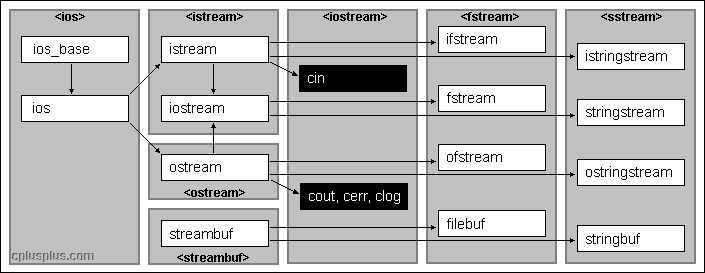
在fstream类中,成员函数open(file_path,flag)实现打开文件的操作,从而将数据流和文件进行关联,作为传入参数的文件打开模式标记(flag)可参看这个文章。
| 模式标记 | 适用对象 | 作用 |
|---|---|---|
| ios::in | ifstream fstream | 打开文件用于读取数据。如果文件不存在,则打开出错。 |
| ios::out | ofstream fstream | 打开文件用于写入数据。如果文件不存在,则新建该文件;如果文件原来就存在,则打开时清除原来的内容。 |
| ios::app | ofstream fstream | 打开文件,用于在其尾部添加数据。如果文件不存在,则新建该文件。 |
| ios::ate | ifstream | 打开一个已有的文件,并将文件读指针指向文件末尾(读写指针的概念后面解释)。如果文件不存在,则打开出错。 |
| ios::trunc | ofstream | 打开文件时会清空内部存储的所有数据,单独使用时与 ios::out 相同。 |
| ios::binary | ifstream ofstream fstream | 以二进制方式打开文件。若不指定此模式,则以文本模式打开。 |
| ios::in | ios::out | fstream | 打开已存在的文件,既可读取其内容,也可向其写入数据。文件刚打开时,原有内容保持不变。如果文件不存在,则打开出错。 |
| ios::in | ios::out | ofstream | 打开已存在的文件,可以向其写入数据。文件刚打开时,原有内容保持不变。如果文件不存在,则打开出错。 |
| ios::in | ios::out | ios::trunc | fstream | 打开文件,既可读取其内容,也可向其写入数据。如果文件本来就存在,则打开时清除原来的内容;如果文件不存在,则新建该文件。 |
// 使用stringstream分割字符,注意引入头文件#include <sstream>
void read_images_text(const string& path)
{
    std::ifstream file(path);//文件到流缓冲,即内存
    std::string line;
    std::string item;
    long double qw, qx, qy, qz, tx, ty, tz;
    unsigned long camera_id;
    string image_name;
    while (std::getline(file, line))
    {
        if (line.empty() || line[0] == '#') {
            continue;
        }
        std::stringstream line_stream1(line);
        line_stream1 >> item; qw = std::stold(item);
        line_stream1 >> item; qx = std::stold(item);
        line_stream1 >> item; qy = std::stold(item);
        line_stream1 >> item; qz = std::stold(item);
        line_stream1 >> item; tx = std::stold(item);
        line_stream1 >> item; ty = std::stold(item);
        line_stream1 >> item; tz = std::stold(item);
        line_stream1 >> item; qw = std::stold(item);
        line_stream1 >> item; camera_id = std::stoul(item);
        line_stream1 >> item; image_name = item;

        // POINTS2D
        if (!std::getline(file, line)) {
            break;
        }
        std::cout <<"processing : " << image_name << std::endl;

        std::stringstream line_stream2(line);
        long double x,y;
        long long point3D_id;
        if (!line.empty())
        {
            while (!line_stream2.eof())
            {
                line_stream2 >> item; x = std::stold(item);
                line_stream2 >> item; y = std::stold(item);
                line_stream2 >> item; point3D_id = std::stoll(item);
                // cout <<x <<" " << y << " " << point3D_id<<" ";
            }
        }
    }
    file.close();
}
// 使用getline分割字符,需指定间隔字符
void read_images_text(const string& path)
{
std::ifstream file(path);
std::string line;
std::string item;
while (std::getline(file, line)) {
StringTrim(&line);
if (line.empty() || line[0] == '#') continue;
std::stringstream line_stream1(line);
// ID
std::getline(line_stream1, item, ' ');
// QVEC (qw, qx, qy, qz)
std::getline(line_stream1, item, ' ');long double qw = std::stold(item);
std::getline(line_stream1, item, ' ');long double qx = std::stold(item);
std::getline(line_stream1, item, ' ');long double qy = std::stold(item);
std::getline(line_stream1, item, ' ');long double qz = std::stold(item);
// TVEC
std::getline(line_stream1, item, ' ');long double tx = std::stold(item);
std::getline(line_stream1, item, ' ');long double ty = std::stold(item);
std::getline(line_stream1, item, ' ');long double tz = std::stold(item);
// CAMERA_ID
std::getline(line_stream1, item, ' ');unsigned long camera_id = std::stoul(item);
// NAME
std::getline(line_stream1, item, ' ');std::string image_name = item;
// POINTS2D
if (!std::getline(file, line)) break;
StringTrim(&line);
std::stringstream line_stream2(line);
if (!line.empty())
{
while (!line_stream2.eof())
{
std::getline(line_stream2, item, ' ');double x = std::stold(item);
std::getline(line_stream2, item, ' ');double y = std::stold(item);
std::getline(line_stream2, item, ' ');
long long point3D_id;
if (item == "-1") {
std::cout <<"2D point has no 3D points" <<std::endl;
point3D_id = -1;
}
else {
std::cout <<"2D point ok!!!" <<std::endl;
point3D_id = std::stoll(item);
}
}
}
}
file.close();
}操作:写
写文件比读文件容易得多,此处可用ofstream进行写入文件。
// 此处给出colmap中WriteImagesText函数
void Reconstruction::WriteImagesText(const std::string& path) const {
  std::ofstream file(path, std::ios::trunc);
  CHECK(file.is_open()) << path;

  // Ensure that we don't loose any precision by storing in text.
  file.precision(17);

  file << "# Image list with two lines of data per image:" << std::endl;
  file << "#   IMAGE_ID, QW, QX, QY, QZ, TX, TY, TZ, CAMERA_ID, "
          "NAME"
       << std::endl;
  file << "#   POINTS2D[] as (X, Y, POINT3D_ID)" << std::endl;
  file << "# Number of images: " << reg_image_ids_.size()
       << ", mean observations per image: "
       << ComputeMeanObservationsPerRegImage() << std::endl;

  for (const auto& image : images_) {
    if (!image.second.IsRegistered()) {
      continue;
    }

    std::ostringstream line; //接收一行数据,通过'<<'接收
    std::string line_string;

    line << image.first << " ";

    // QVEC (qw, qx, qy, qz)
    const Eigen::Vector4d normalized_qvec =
        NormalizeQuaternion(image.second.Qvec());
    line << normalized_qvec(0) << " ";
    line << normalized_qvec(1) << " ";
    line << normalized_qvec(2) << " ";
    line << normalized_qvec(3) << " ";

    // TVEC
    line << image.second.Tvec(0) << " ";
    line << image.second.Tvec(1) << " ";
    line << image.second.Tvec(2) << " ";
    line << image.second.CameraId() << " ";
    line << image.second.Name();
    file << line.str() << std::endl;
    line.str("");
    line.clear();

    for (const Point2D& point2D : image.second.Points2D()) {
      line << point2D.X() << " ";
      line << point2D.Y() << " ";
      if (point2D.HasPoint3D()) {
        line << point2D.Point3DId() << " ";
      } else {
        line << -1 << " ";
      }
    }
    line_string = line.str();
    line_string = line_string.substr(0, line_string.size() - 1);
    file << line_string << std::endl;
  }
}
补充:读写数据时可能会涉及字符串与数字的转换,如下给出二者转换的方法。
//string to number
template <typename Type>
Type tonumber(string str)
{
    std::stringstream ss;
    ss << str;
    Type ret = 0;
    ss >> ret;
    return ret;
}
//number to str
template <typename Type>
string tostring(Type number)
{
    std::stringstream ss;
    ss << number;
    string ret;
    ss >> ret;
    return ret;
}
// 调用时:
string str = "1403636580838555648";
uint64_t number = 1403636580838555648;
num_convert = tonumber<uint64_t >(str);
str_convert = tostring<uint64_t >(number);
语言:Python
操作:读
def read_images_text(path):
    images = {}
    with open(path, "r") as fid:
        while True:
            line = fid.readline()#读取一行数据
            if not line:
                break
            line = line.strip() #移除字符串头尾指定的字符(默认为空格或换行符)或字符序列
            if len(line) > 0 and line[0] != "#":
                elems = line.split()  #分割字符
                image_id = int(elems[0])
                qvec = np.array(tuple(map(float, elems[1:5])))
                tvec = np.array(tuple(map(float, elems[5:8])))
                camera_id = int(elems[8])
                image_name = elems[9]
                elems = fid.readline().split()
                xys = np.column_stack([tuple(map(float, elems[0::3])),
                                       tuple(map(float, elems[1::3]))])
                point3D_ids = np.array(tuple(map(int, elems[2::3])))
                images[image_id] = Image(
                    id=image_id, qvec=qvec, tvec=tvec,
                    camera_id=camera_id, name=image_name,
                    xys=xys, point3D_ids=point3D_ids)
    return images
操作:写
使用 File(文件)open(file, mode='r') 方法,如下面写 SFM matchs-pair.txt 的方法:
pairs = []
for query, indices in zip(query_names, topk):
    for i in indices:
        pair = (query, db_names[i])
        pairs.append(pair)

logging.info(f'Found {len(pairs)} pairs.')
with open(output, 'w') as f:
    f.write('\n'.join(' '.join([i, j]) for i, j in pairs))
以及写 SFM 模型images.txt的方法都值得参考。
# 写
def write_images_text(images, path):
    if len(images) == 0:
        mean_observations = 0
    else:
        mean_observations = sum((len(img.point3D_ids) \
         for _, img in images.items()))/len(images)
    HEADER = "# Image list with two lines of data per image:\n"
    "#   IMAGE_ID, QW, QX, QY, QZ, TX, TY, TZ, CAMERA_ID, NAME\n"
    "#   POINTS2D[] as (X, Y, POINT3D_ID)\n"
    "# Number of images: {}, mean observations per image: {}\n"\
    .format(len(images),mean_observations)

    with open(path, "w") as fid:
        fid.write(HEADER)
        for _, img in images.items():
            #写图像ID/位姿/相机ID/图像名
            image_header = [img.id, *img.qvec, *img.tvec, img.camera_id, img.name]
            first_line = " ".join(map(str, image_header))
            fid.write(first_line + "\n")
            #写2D点
            points_strings = []
            for xy, point3D_id in zip(img.xys, img.point3D_ids):
                points_strings.append(" ".join(map(str, [*xy, point3D_id])))
            fid.write(" ".join(points_strings) + "\n")